
How I Turned a $100 Dell Pre-built Computer Into a Gaming PC
Welcome back to Daily Dogmas!
As a technology enthusiast on a budget, I've scored a few good deals on Facebook Marketplace. This story is about one of those scores.
Here I was, just four or five months after a major breakup. I had no computer and no components, but thankfully all of the peripherals I needed for a basic computer setup. I found myself working at a local entertainment venue and using their employee computers in a personal capacity almost daily. Whether I needed to work on a spreadsheet, send a formal email, or complete another task I couldn't easily do from my phone, I found the need for a computer grew more and more each day.
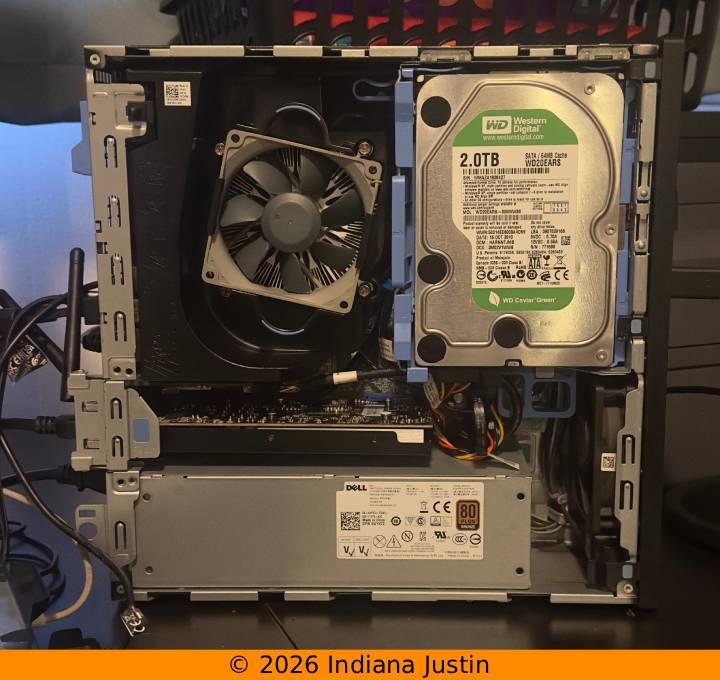
After looking around online, I found that some people have had success buying old office or school computers and upgrading them for personal or even gaming use. This pushed me to do further research. I needed something smaller-scale and preferably local. My local computer store didn't have anything reasonably priced, so I looked to Facebook Marketplace. This was where I found a gentleman selling a Dell OptiPlex 5040 that had been modified to run Windows 11. This sounded right up my alley!
I messaged this gentleman and asked him for some information about the computer. It turned out to be equipped with an i7-6700 and 16 GB of RAM, plus Windows 11. That was all I cared about at this point! I knew I could upgrade the computer's storage myself if I so wished, so these components and the fact the computer ran Windows 11 were stellar. After some failed negotiations on my part, I met the gentleman at a local library and paid his list price of $100. The deal was done and I now had a new (to me) computer. My only issue now was getting it to run video games.
After some further research, I found that only a handful of graphics cards (GPUs) were compatible with my PC. The issue was they not only needed to fit the small form factor, but also only draw power from the PCI-E lane, meaning most GPUs were out of the question. This left me with two decent options for consumer graphics cards: the Radeon RX 550, priced at $50 from Micro Center, or very specifically, the Yeston AIB version of the RTX 3050 6 GB GPU, priced at roughly $225 when I bought the computer. I chose the Radeon RX 550 simply for its low price and ability to run some modern games. After all, I was balling on a budget.
After picking up the Radeon RX 550 from Micro Center and installing it in my computer, I was thrilled to see I could run Rocket League and Minecraft somewhat smoothly. After some tinkering with settings, I was able to push about 90 frames per second (FPS) in Rocket League, and about 60 FPS in Minecraft. This was good enough for me! I had successfully taken a $100 PC, added a $50 GPU, and gained the ability to play the games I love.
After some light gaming, which is rather intense for this PC, I noticed the fans were awfully loud. This led me to order a pair of 40 mm Noctua fans to quiet my system down under load. This worked out beautifully after a few snags with getting the old fans unscrewed. They ended up coming out in pieces, but that's okay.
Further use of my PC led me to explore reinstalling Windows 11 and subsequently my need for a solid state drive (SSD). If any of you know how much the price of components, specifically RAM, SSDs, and GPUs have gone up lately, you'd know a brand new Samsung NVMe drive would be out of reach for me. This was where I turned back to Facebook Marketplace. I was able to find an SSD from a different gentleman not far from me for only $40. It was just a 512 GB drive, but it outperformed the existing hard disk drives my computer came equipped with by a margin.
That all leads me to the present. I am still using the Dell pre-built with a Radeon RX 550 and a Marketplace SSD. My plans are to upgrade the RX 550 GPU to the Yeston RTX 3050 6 GB (if it comes back in stock) and then start to save up money for an entirely new build. As I close, I would like to express my satisfaction with this setup. Sure, the components are going on 10 years old, but this machine has mostly stood the test of modernity. It has gotten me through two college courses, many games of Rocket League, and countless hours of livestreaming, all without breaking too much of a sweat. My only qualm with this setup would be the CPU not being supported by many anti-cheat softwares and the fact that my GPU configuration does not support 1080p resolution over 60Hz. Regardless, I am very happy with my setup for the price I paid!
Thanks for reading!
— Indiana Justin